
Oracle Fusion is built to run the whole business: finance, procurement, supply chain, inventory, HCM (Human Capital Management), projects, order management, all in one platform. That’s exactly what makes it powerful, and exactly why getting data into it is rarely simple.
Entering one record by hand? Fine, anyone can do that in a few clicks. But the moment you’re loading a few hundred purchase orders, updating thousands of item records, or correcting a batch of supplier details, manual entry stops being a minor annoyance and starts being a real drag on the team, slow, repetitive, and one typo away from a failed load.
Here’s the part most teams don’t expect going in: the real challenge isn’t just the one-time data migration everyone braces for during implementation. That’s a known, bounded project with a start and end date. The bigger, quieter problem is what happens every week after go-live, the recurring purchase order batches, the AP invoice uploads, the mass updates to supplier or item records, the corrections that come up out of nowhere. That’s the work that never really stops, and it’s the work most Oracle data entry tools were never actually built for.
What Is Oracle Fusion Bulk Data Import?
Oracle Fusion bulk data import is exactly what it sounds like: creating or updating large volumes of Oracle records without keying them in one at a time. Instead of opening a record, typing in every field, saving, and repeating that hundreds or thousands of times, you’re processing a whole batch at once.
A few things worth being clear on upfront:
- It’s not just for new records. Bulk import covers updates to existing data too, price changes, supplier detail corrections, item attribute updates, not only fresh record creation.
- It’s not just a migration thing. Yes, it’s essential during implementation and initial data migration, but it matters just as much for the recurring, day-to-day loads that keep happening long after go-live.
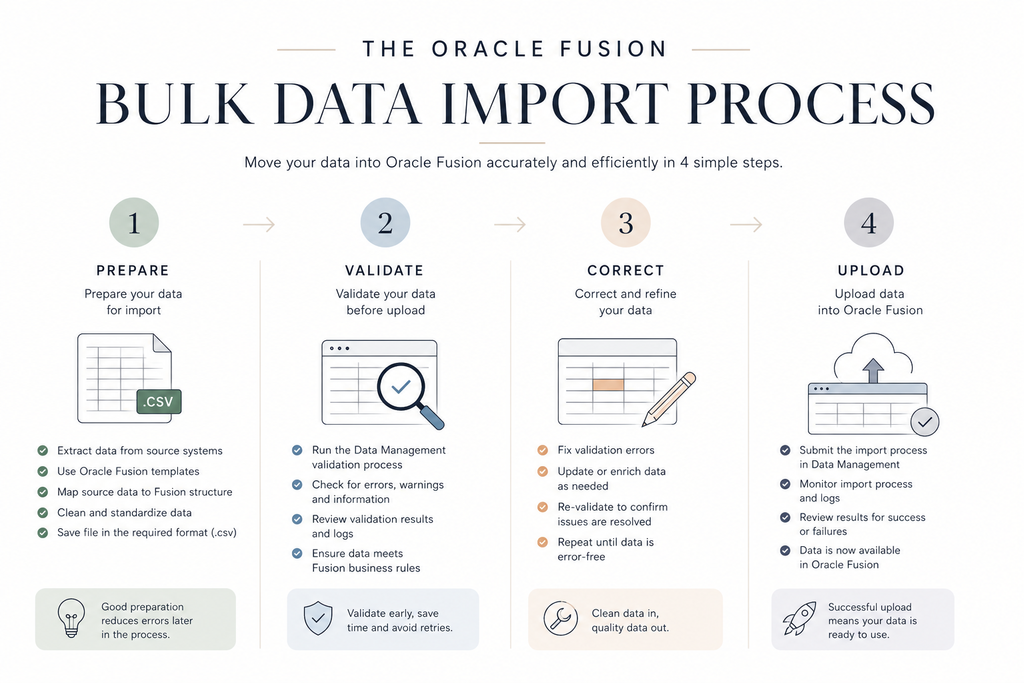
- Uploading a file is only part of it. A real bulk import process needs to cover preparation, validation, correction, and upload, not just “get the file into Oracle and hope it sticks.” A tool that only handles the upload step is solving the easy 20% of the problem.
Bulk Import vs. Mass Update: Why the Difference Matters
Many bulk-loading tools are optimized for getting new records into Oracle, that was the original intent behind FBDI and HDL. But recurring business operations frequently require changing data that already exists. Updating supplier attributes, changing purchase order lines, correcting invoices, maintaining item attributes, updating projects, or cleaning up data after go-live are all examples of the same underlying need: not creating something new, but fixing or maintaining something that’s already there.
A useful Oracle bulk data tool has to handle both halves of that job, bulk creation and mass maintenance of existing Oracle records, in the same workflow. A tool that only excels at loading new records still leaves teams stuck doing every correction and update the slow way.
Why High-Volume Data Entry and Mass Updates Are Painful in Oracle Fusion
Oracle Fusion’s depth is exactly what makes bulk data entry hard. Most records aren’t just a handful of simple fields, they come loaded with required fields, dependencies between records, lookups, flexfields, and attachments, all wrapped in Oracle’s own validation rules. Miss one required value or get one lookup wrong, and the whole record gets kicked back.
Here’s where it gets frustrating: business users almost always start in Excel, it’s where the data lives, where it gets cleaned up, where it makes sense to work. But getting that Excel data into Oracle usually means routing it through a process that wasn’t built with Excel-first users in mind, templates, formatting rules, file conversions, uploads, and scheduled processes standing between “my data is ready” and “my data is in Oracle.”
And the errors don’t show up when you’d want them to. Instead of catching a problem while you’re still working in Excel, most native tools let you upload first and find out later, often well after the process has already run. That means rework, a trip back to IT, or just uploading the same file again and hoping it’s right this time.
Mass updates make all of this worse. Fixing one record is annoying but manageable. Needing to update hundreds or thousands of existing records quickly, a pricing change, a compliance-driven field update, a bulk correction after a bad import, turns a small task into a multi-day headache when the tooling wasn’t built for it.
Oracle Native Import Options and Their Limitations
Oracle doesn’t leave you with nothing, there are several native ways to get data in and out of Fusion. The problem isn’t a lack of options. The problem is that each one was built to solve a narrow slice of the job, and none of them was built with the everyday business user in mind.
FBDI (File-Based Data Import)
FBDI is the workhorse for structured bulk loads across most Oracle Fusion areas outside of HCM, think purchase orders, AP invoices, suppliers, inventory, and more. It can genuinely move a lot of data. But two gaps show up almost immediately once you’re past a one-time load:
- It’s technically demanding. A typical FBDI run means downloading a template, formatting data precisely the way Oracle expects, generating and zipping CSV files, uploading, kicking off a scheduled process, and waiting to see what comes back. Every one of those steps is a place where something can go wrong, and each error adds time that eats directly into project timelines and budgets.
- It wasn’t designed for business users. FBDI was built for IT teams and system integrators, not for the person who actually owns the data. That means routine loads, corrections, and updates almost always require looping in a technical resource, an ongoing dependency that doesn’t go away once the initial migration is done.
HDL (HCM Data Loader)
HDL is FBDI’s counterpart for Human Capital Management data, and it inherits the same DNA. It relies on the same structured file formats and scheduled process management, which means the same error-prone, time-consuming workflow, just scoped to HCM data. It’s built for technical teams handling large HCM loads, so HR or business users needing to make routine corrections or run recurring updates still need IT in the loop.
ADFdi (ADF Desktop Integration)
ADFdi takes a friendlier approach: it’s an Excel plugin that connects live to Oracle, with inline validation and list-of-values lookups built right into the spreadsheet. That’s a real step up from FBDI’s template-and-upload cycle, you get validation before you’re fully committed to the load. But ADFdi templates only exist for a specific set of Oracle objects and processes, so if your use case isn’t one of them, it’s not an option at all. It also requires a desktop Excel plugin to function, and uploads slow down noticeably at higher volumes, fine for basic, low-volume loads, not for real bulk work.
HSDL (HCM Spreadsheet Data Loader)
HSDL is ADFdi’s counterpart for HCM, spreadsheet-based and more approachable than HDL. Like ADFdi, though, it only supports a narrow set of predefined HCM processes rather than acting as a general-purpose way to manage HCM data, and it hits the same ceiling once volume or complexity picks up.
REST and SOAP APIs
APIs let systems talk to Oracle directly for integration and real-time data exchange, and for that job, they’re genuinely strong. The catch is that using them means custom build-out, testing, and ongoing maintenance every time something changes on the Oracle side, all of it developer-owned. That makes APIs excellent for automated, system-to-system workflows, but the wrong tool for the routine, day-to-day data entry and correction work business teams actually need to handle.
Manual Oracle Screens
Oracle’s own UI lets users enter or edit records directly, one at a time. That’s fine for a single record or a quick fix, but there’s no way to validate, batch-correct, or reprocess data at scale through manual screens. Every change is a one-at-a-time, click-by-click process, workable for the occasional edit, unrealistic for updating hundreds or thousands of records.
The Business User Gap
Here’s the thing worth sitting with for a second: the problem was never that Oracle doesn’t have enough tools. It has plenty. The problem is that every one of them was designed around Oracle’s mechanics, not around how business users actually get work done.
Another challenge is that Oracle’s tools vary by module, business object, and transaction type. A user loading AP invoices follows one process, while someone maintaining suppliers, purchase orders, projects, or items follows an entirely different one, with its own template, its own quirks, its own failure points. For business users, that creates a fragmented experience: there’s no single way to work with Oracle data, just a patchwork of processes to remember depending on what you’re touching that day. API Wizard replaces that patchwork with one common, Excel-based workflow across all of it.
Think about how the work really happens. Business users live in Excel. That’s where they build the data, review it, catch the obvious mistakes, and get it into shape before it ever touches Oracle. What they need from that point forward is simple: clear validation so they know what’s wrong before it’s a problem, an easy way to fix it, and a fast path to upload once it’s clean.
What they shouldn’t need is a crash course in FBDI file formatting, a rundown of what a cryptic Oracle error code actually means, or a standing relationship with IT just to get a routine batch of records loaded. And yet that’s exactly the position most native tools put them in.
That dependency creates a real bottleneck, not just during migration, but every single time a recurring load, a correction, or a mass update comes up after go-live. IT and consultants end up fielding requests they shouldn’t have to touch, and business users end up waiting on someone else to do work they understand better than anyone.
The fix isn’t lowering the bar on data quality or security, Oracle’s validations and controls exist for good reason. The fix is giving business users more control within those guardrails, not around them, so the people closest to the data can actually own the process instead of routing it through everyone else first.
What to Look for in the Best Oracle Fusion Bulk Data Import Tool
Once you accept that Oracle’s native tools each solve a piece of the problem and not the whole thing, the natural next question is: what should you actually be looking for in something that does? Here’s the checklist worth running any tool through before you commit to it.
How you work with the data
- Excel-based data preparation. If it doesn’t start where your team already works, adoption will be an uphill fight from day one.
- Pre-upload validation. Catching problems before the file ever touches Oracle, not after, is the difference between a smooth load and a week of rework.
- Clear, business-user-friendly error messages. “Invalid value for attribute XYZ_FLEX_2” doesn’t help anyone. A good tool tells you what’s actually wrong and how to fix it.
- Easy correction and reprocessing. When something does fail, fixing it and resubmitting should take minutes, not a fresh trip through the whole upload process.
What it can actually handle
- High-volume record creation. It needs to hold up at real scale, not just in a demo with 20 sample rows.
- Mass updates to existing Oracle data. Creating new records is only half the job; updating thousands of existing ones quickly matters just as much.
- Broad Oracle module coverage. A tool that only works for suppliers or only works for AP invoices just means you’re back to stitching together multiple tools.
- Support for recurring operational loads. The best tool treats weekly and monthly loads as a first-class use case, not an afterthought bolted onto a migration tool.
Who it takes off the critical path
- Reduced dependency on IT and consultants. If business users still need someone technical every time, you haven’t actually solved the bottleneck.
- Support for business-specific rules and validations. Every org has its own quirks and edge cases; the tool should flex to those, not force you to work around it.
- Flexibility for different departments and data processes. Finance, procurement, and supply chain don’t work identically, the tool shouldn’t assume they do.
- Scalability across teams and use cases. What works for one department’s pilot project needs to hold up once it’s rolled out company-wide.
What it doesn’t compromise on
- Compatibility with both Oracle Fusion Cloud and Oracle EBS. Useful if you’re mid-migration, running a hybrid environment, or supporting teams still on EBS.
- Secure Oracle integration. More control for business users should never mean fewer guardrails, security and governance still need to hold.
Run any tool you’re evaluating through this list. If it’s missing more than a couple of these, you’re likely looking at another partial solution, not the fix.
How API Wizard Solves High-Volume Data Entry and Mass Updates
This is exactly the gap the best Oracle Fusion bulk data import tool needs to close, and it’s what API Wizard was built for. API Wizard is an Excel-based Oracle data processing solution that helps business users create, update, validate, correct, and upload Oracle Fusion data faster, and with far fewer failed loads along the way.
Here’s how it stacks up against what actually matters when evaluating Oracle Fusion bulk data import tools:
- A familiar, Excel-based workflow: No new interface to learn, no plugin-heavy workaround. API Wizard’s Excel-based Oracle data import experience meets business users exactly where they already prepare and review data every day.
- Bulk record creation and mass updates in one tool: Whether it’s a fresh batch of purchase orders or a mass update to existing Oracle records, API Wizard handles both, not just new-record creation. Most native Oracle tools force a choice; API Wizard doesn’t.
- Pre-upload validation that catches errors early: Instead of finding out something’s wrong after the file’s already uploaded and the process has run, users get pre-upload data validation while they’re still working in Excel, where mistakes are fastest to catch and fix.
- Error correction, done in Excel: No jumping between systems or waiting on a second upload cycle. Users correct errors directly in Excel and reprocess immediately, cutting the back-and-forth that slows down most Oracle data entry workflows.
- Less dependence on IT and consultants: Business users get the control to run their own loads, corrections, and recurring uploads independently. That reduces IT dependency and frees technical teams to focus on actual technical work instead of routine data requests.
- Built for recurring uploads and mass updates, not just migration: API Wizard treats recurring Oracle data loads as the default use case, not an afterthought bolted onto a one-time migration tool. That matters, because most Oracle data work happens after go-live, not during it.
- Works across Oracle Fusion Cloud and Oracle EBS: API Wizard supports Oracle Fusion Cloud and Oracle E-Business Suite (EBS), useful whether you’re fully on Fusion, still running EBS, or mid-migration between the two.
- Broad coverage across Oracle modules: Purchase orders, AP invoices, suppliers, inventory, projects, and more, one consistent tool instead of stitching together FBDI, ADFdi, and manual screens for different processes.
Put together, this is what actually solves high-volume Oracle Fusion data entry: not just a faster way to upload files, but a genuinely different way to own the whole process, from Excel to Oracle and back, without IT standing in the middle of every load.
Best For
Business users and functional teams (finance, procurement, supply chain, HR) who need to run bulk creates, mass updates, and recurring Oracle Fusion data loads on their own, without waiting on IT or consultants for every batch, correction, or fix. Especially useful for organizations mid-migration from EBS to Fusion, or running both environments in parallel, since it works across both without requiring a separate toolset for each.
Common API Wizard Use Cases
Talking about “high-volume data entry” in the abstract only goes so far. Here’s what this actually looks like in day-to-day Oracle Fusion work.
1. Purchase Orders
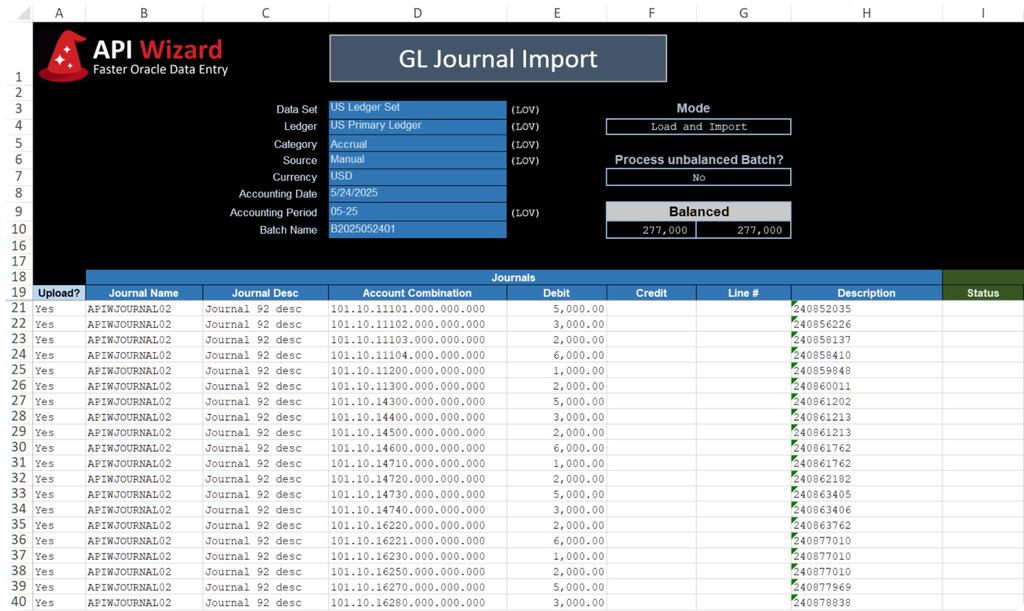
Purchase orders are one of the most common places teams feel the pain of manual entry, and one of the easiest to fix with bulk processing. API Wizard lets teams create purchase orders in bulk instead of building them one at a time, and update PO headers, lines, schedules, and distributions across a whole batch in one pass. Need to add or cancel a line without rebuilding the entire PO? Done in Excel. Routing POs for approval, updating ship dates, or adjusting other PO details across dozens or hundreds of orders all works the same way, prepare the change, validate it, push it through.
2. AP Invoices
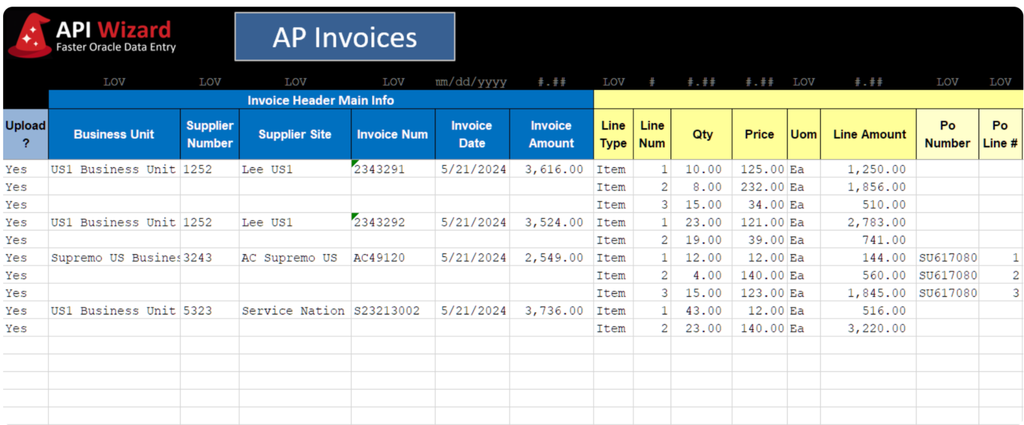
Invoice processing is where errors tend to pile up fastest, and where they’re most expensive to leave uncaught. API Wizard supports uploading invoices in bulk, correcting invoice lines without restarting the whole submission, and matching invoices to POs directly from the same workflow. Teams can also manage invoice holds, load prepayments, and update invoice details across a batch, instead of opening each invoice individually to make the same small correction over and over.
3. Supplier and Customer Maintenance
Supplier and customer records rarely stay static for long, new sites, updated contacts, changing payment terms, tax attribute updates. API Wizard handles creating or updating supplier records, maintaining supplier sites, contacts, payment details, and tax attributes, and updating customer accounts, sites, and billing information, all without needing a separate process for each type of change.
4. Inventory and Item Updates
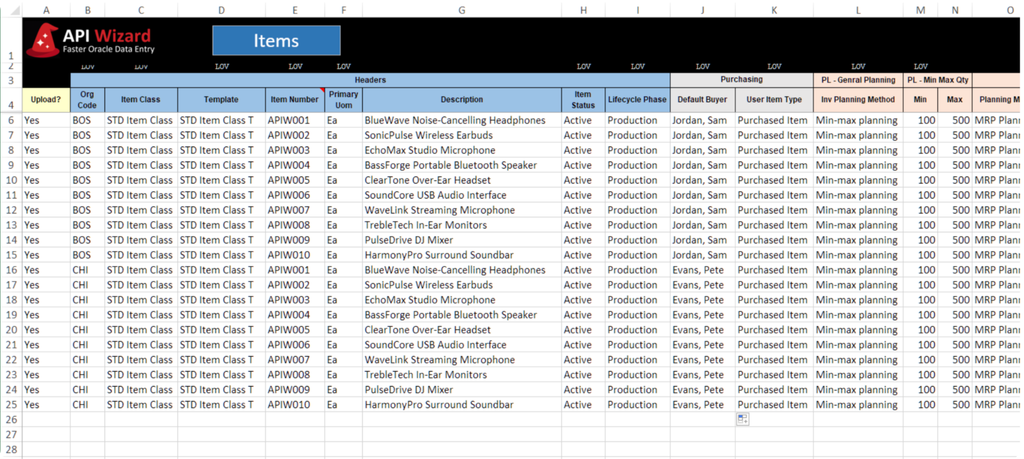
Inventory data shifts constantly, and a lot of that shifting happens in bulk. API Wizard supports maintaining item records, updating item attributes, and processing inventory adjustments, along with broader inventory-related bulk updates. When a batch change comes through, a new attribute rollout, a pricing update, a reclassification, teams aren’t stuck editing items one by one.
5. Finance, Projects, and Recurring Loads
This is where the “not just migration” point really shows up. API Wizard supports loading project data, processing financial updates, and managing recurring operational files, the batches that come around every week or month long after go-live, not just during the initial implementation push. It’s also built to handle the volume spikes that come with month-end or period-end data activity, when timelines get tight and there’s no room for a slow, error-prone process.
API Wizard vs. Oracle Native Tools
Seeing everything side by side makes the gap easy to spot. Here’s how API Wizard stacks up against Oracle’s native import options across the criteria that actually matter for day-to-day bulk data work:
| Capability | API Wizard | FBDI/HDL | ADFdi | HSDL | REST/SOAP APIs |
| Excel-based workflow | Yes | Partial | Limited | Limited | No |
| Business-user friendly | Yes | No | Partial | Partial | No |
| Bulk create records | Yes | Yes | Limited | HCM only | Yes |
| Mass update records | Yes | Limited | Limited | HCM only | Custom |
| Pre-upload validation | Yes | No | No | No | Custom-built |
| Clear error correction | Yes | No | Partial | Partial | No |
| Broad Oracle coverage | Yes | Broad but complex | Limited | HCM only | Technical |
| Low IT dependency | Yes | No | Partial | Partial | No |
| Recurring operational loads | Yes | Manual-heavy | Limited | Limited | Developer-owned |
A few things stand out once it’s laid out this way. FBDI covers a lot of ground, but “broad but complex” is doing a lot of work in that row, coverage doesn’t help much if business users can’t run it themselves. ADFdi and HDL/HSDL improve the experience but only within a narrow lane. And APIs are strong exactly where you’d expect, custom, developer-owned work, and weak everywhere a business user needs day-to-day control.
API Wizard is the only option on this list that checks every box without an asterisk, which is really the point: it’s not trying to out-technical FBDI or out-integrate APIs, it’s built to be the one tool business users can actually own, start to finish.
Useful for Migration, But Even More Valuable After Go-Live
Bulk data import matters during Oracle Fusion implementation and migration, that part’s obvious. Loading years of legacy data, standing up new master records, getting everything in place before cutover, it’s exactly the kind of high-volume work this whole article has been about.
But here’s what a lot of teams don’t fully plan for: data processing doesn’t stop the day you go live. It just changes shape. Teams keep managing uploads, updates, corrections, and recurring data processes every single week after that, and the issues that come up post-go-live often need quick, unplanned mass updates, not the kind of thing you can schedule around a project timeline.
That’s exactly where a migration-only tool runs out of road. It was built to solve a temporary problem, get the data in, once, and hand off. Once that project wraps, so does its usefulness, leaving teams right back to stitching together native tools or leaning on IT for the ongoing work that never actually stopped.
API Wizard isn’t built around that assumption. It supports the implementation push just as well, but it’s designed for the long run, the weekly loads, the recurring corrections, the mass updates that show up out of nowhere six months after go-live.
The real takeaway: the best Oracle Fusion bulk data import tool should absolutely help during migration. But its bigger value shows up after that, in the day-to-day Oracle data processing that keeps happening long after the migration project is closed out.
Why API Wizard Is the Best Fit for High-Volume Oracle Fusion Data Entry
Pull everything together, and the case for API Wizard isn’t really about any one feature, it’s about how well the whole thing fits how business users actually need to work.
It starts with the interface: everything happens in Excel, the environment teams already use to prepare and review data, so there’s no new tool to learn before the real work can start. From there, teams can create and update Oracle records in bulk, covering both new-record creation and mass updates in one workflow instead of forcing a choice between the two.
Data gets validated before it ever reaches Oracle, which means problems surface while they’re still easy to fix, not after a failed load has already cost the team a day. And when something does need correcting, the process stays simple and stays in Excel, no jumping between systems, no starting the upload over from scratch.
The bigger shift is who’s doing the work. Manual effort drops, and so does the dependency on IT and consultants, business users get to own the process end to end, from preparation through upload. That ownership extends across a broad range of Oracle processes, so teams aren’t stitching together a different tool for every module.
API Wizard also works across both Oracle Fusion Cloud and Oracle EBS, useful whether you’re fully migrated, mid-transition, or running both in parallel. And it’s built for more than the migration moment, it supports recurring data entry, mass updates, and the post-go-live cleanup work that shows up week after week, long after the initial project wraps.
None of this is theoretical. It’s proven use across hundreds of customers, teams running exactly this kind of high-volume Oracle Fusion data entry, day in and day out, without the friction native tools force on them.
Conclusion
Oracle Fusion gives organizations several ways to load data, but the right approach depends on what you’re trying to accomplish. For occasional technical migrations, Oracle’s native tools may be sufficient. For teams that routinely create, update, correct, and maintain large volumes of Oracle data, the workflow matters just as much as the underlying import technology.
API Wizard gives Oracle users a consistent Excel-based way to work with their data, while maintaining Oracle’s business rules, validations, and security.
Want to see how API Wizard handles your Oracle data-entry process? Request a demo and we’ll show you using a business process relevant to your team.
Frequently Asked Questions
What is the easiest way to do bulk data import in Oracle Fusion?
The easiest approach is an Excel-based tool that lets you prepare, validate, correct, and upload data without wrestling with manual screens or a complex technical workflow. That’s the whole idea behind API Wizard, keep the process in Excel, where your team already works.
What’s the difference between FBDI and ADFdi in Oracle Fusion?
FBDI is a file-based process, templates, CSV files, zip uploads, scheduled processes, and error review after the fact. ADFdi is a more Excel-friendly plugin available for a limited set of Oracle Fusion objects. Both work, but neither was built to be the everyday tool for business users.
Can I import data into Oracle Fusion using Excel?
Yes. Oracle offers some Excel-based options like ADFdi and the spreadsheet templates used in FBDI. API Wizard takes that further, giving business users a more flexible, fully Excel-based way to create, update, validate, and upload Oracle Fusion data, without the coverage gaps or plugin limitations.
How is API Wizard different from Oracle’s native tools?
API Wizard gives business users one consistent, Excel-based experience for preparing, validating, correcting, and uploading Oracle data, instead of switching between FBDI for one process, ADFdi for another, and IT for everything else. It reduces manual effort, supports high-volume processing, and works across both Oracle Fusion Cloud and Oracle EBS.
Does API Wizard work for both new records and mass updates?
Yes. Unlike several native Oracle tools that only handle one or the other well, API Wizard supports creating new records and mass-updating existing ones in the same workflow, useful whether you’re loading data for the first time or making a bulk correction six months after go-live.