
Oracle Fusion Cloud · Free, Full-Featured
Query Oracle Fusion. Write real SQL. Get real answers.
Skip the OTBI report you have to build just to answer one question. Skip the free tool that caps your rows at 500. Write real Oracle SELECT SQL – joins, subqueries, unions, bind variables – in one focused Windows workspace built only for Fusion.
Windows 10/11 · No Oracle client or JDBC driver · OAuth/SSO supported
Built by API Wizard – 16+ years of Oracle Fusion & EBS expertise, trusted by 500+ customers. Used daily by implementation teams and the Fusion consultants who support them.
1 Write the query
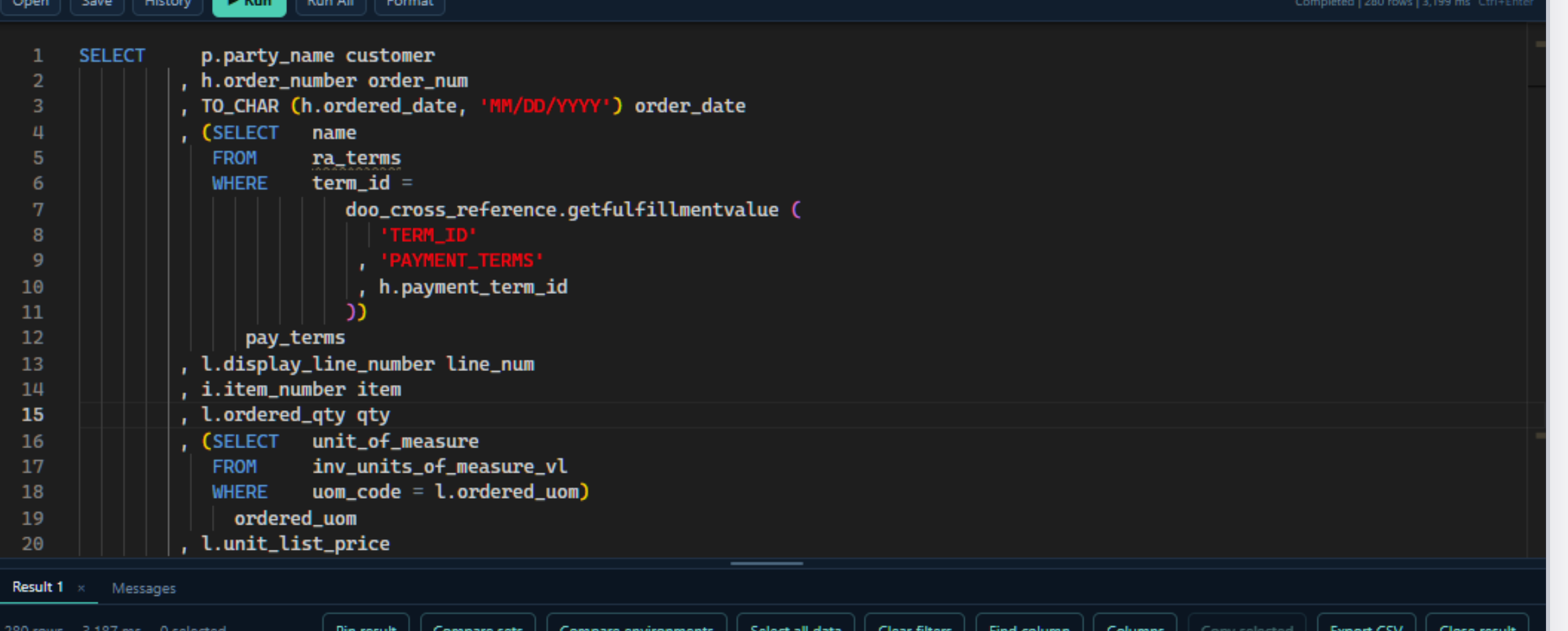
2 Get the answer, instantly

A comparison capability built specifically for Fusion
Don't just run a query. Know what changed.
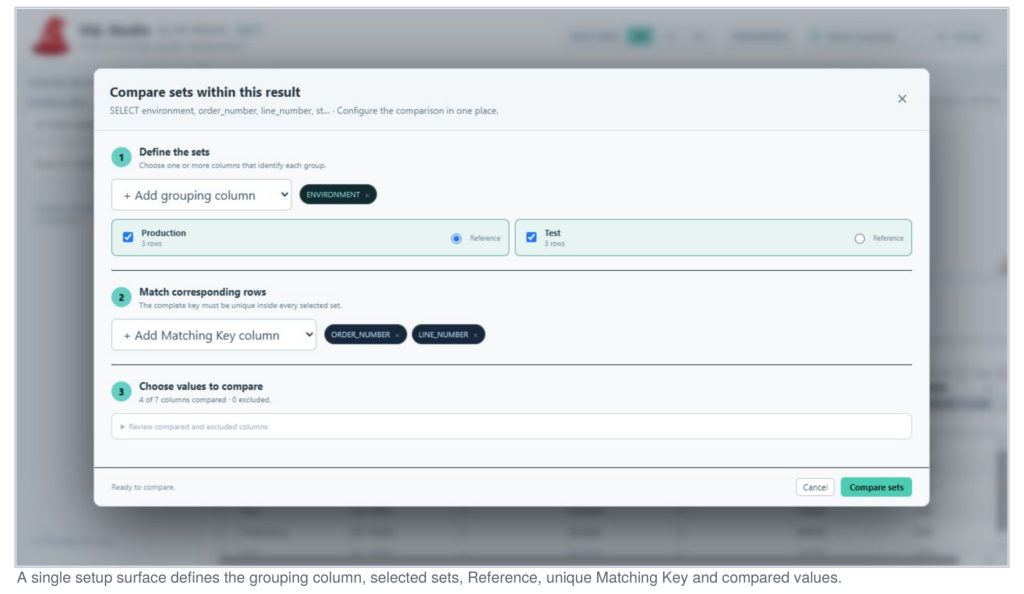
Broad BI platforms like Tableau can compare data sets in a general sense, but few if any Oracle Fusion-specific query tools build that capability in. SQL Studio does: pick a reference set and a matching key, and it tells you exactly what’s the same, different, missing or additional – across users, business groups, or Production vs. Test. Click either screenshot to zoom in.
1 Set up the comparison
2 Read the result instantly
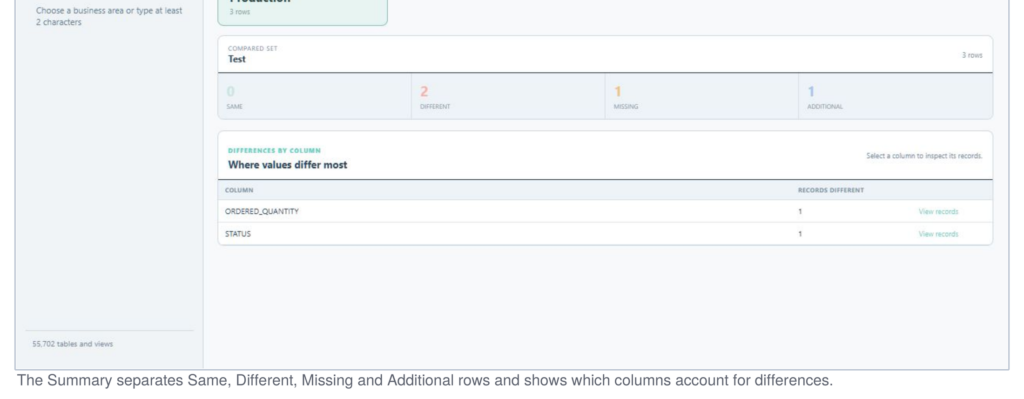
Migration teams use this to validate a Fusion cutover row by row. Support teams use it to explain why Production and Test disagree. Either way, it’s a feature you’d otherwise need a separate BI platform to get – and here it’s included, free.
Why not just use what's already out there
Every other option makes you trade something off.
Free Fusion query tools exist – they just stop short. Full-featured tools exist too – they just cost real money per seat. SQL Studio was built to close that gap.
| Capability | Typical free tools | Full-featured paid tools | SQL Studio |
|---|---|---|---|
| Real Oracle SELECT SQL - joins, subqueries, unions, binds | Limited | Yes | Yes |
| Built specifically for Oracle Fusion | Rarely | Yes | Yes |
| Cross-environment & result-set comparison | No | No | Built in |
| Row limits on preview / export | Often capped | Varies by plan | None |
| Price | $0 | $$$ per user | Free |
SQL without the runaround
The Oracle Fusion query tool built for people who already know what they need. Write it. Run it. Use the answer.
Write any SQL
Familiar Oracle SELECT syntax - joins, subqueries, unions and bind variables - without building a report first.
Powerful result handling
Sort, filter, find, rearrange, hide, select, copy and export the data that matters.
Result set comparison
Compare users, groups or Fusion environments with matching keys, field-level differences and Excel output.
Multiple environments
Keep Production, Test, Development and Demo connections independent at the query-tab level.
Parallel processing
Run independent queries concurrently while continuing to work in other tabs.
Large-result support
Preview quickly, retrieve all rows on demand and export the complete result without freezing the workspace.
Reusable SQL workflow
Save SQL files, review searchable history, prompt for bind variables and pin multiple results.
SSO integrated
Use Oracle IAM/IDCS OAuth Device Code with your organization's existing trusted application.
Yes, really free
Free to use.
No credit card. No artificial row limits. Download SQL Studio and start writing SQL against Fusion today.
Yes, really free
16+
Years in Oracle EBS & Fusion
500+
Enterprise customers
$0
Cost to get started
None
Row limits on preview or export
Get started
Installed and querying in minutes
1
Download the installer
Share a few quick details and grab the Windows setup file below – no Oracle client or JDBC driver required.
2
Run setup
SQL Studio installs itself and the bundled Fusion metadata pack automatically on first launch.
3
Register in two clicks
The app confirms your email on first launch, that’s it. No sales call, no waiting for approval.
4
Write your first query
Connect to Fusion, and autocomplete and metadata guidance are ready as soon as you start typing.
Before you download
What you'll need
| Requirement | Details |
|---|---|
| Operating system | Windows 10 or Windows 11, 64-bit |
| Network access | To your Oracle Fusion environment, and, for OAuth sign-in, its Oracle IAM/IDCS domain |
| Credentials | An Oracle Fusion username and password, or Oracle OAuth application details from your Fusion administrator |
| Fusion setup | Access to the SQL Studio BI Publisher report, provisioned by your Fusion administrator |
Your Oracle Fusion data, finally at your fingertips.
Investigate issues, validate changes and compare environments in minutes instead of waiting on another reporting cycle. Tell us a bit about yourself and download instantly.
Windows installer · Fusion metadata included · No credit card · Used only so we know who's using SQL Studio